Survey DVR · Position fixes · Overlay · Narration · Broadcast
The survey DVR that runs on the PC you already have.
WoodDVR records up to four ROV cameras in 30-minute sections with the survey data string logged beside them, burns a survey overlay into the video, records the surveyor's narration with offline subtitles, takes averaged position fixes with quality statistics, and sends the pictures back out to the client. The free WoodDVR Reviewer plays it all back, every camera in step, every fix a click away. One installer. No rack unit. Published pricing.
Built by a working offshore survey party chief. Licensed per PC, keys issued by email, all features in the trial. The Reviewer needs no key at all.
What it does
Everything the DVR seat needs, in one window.
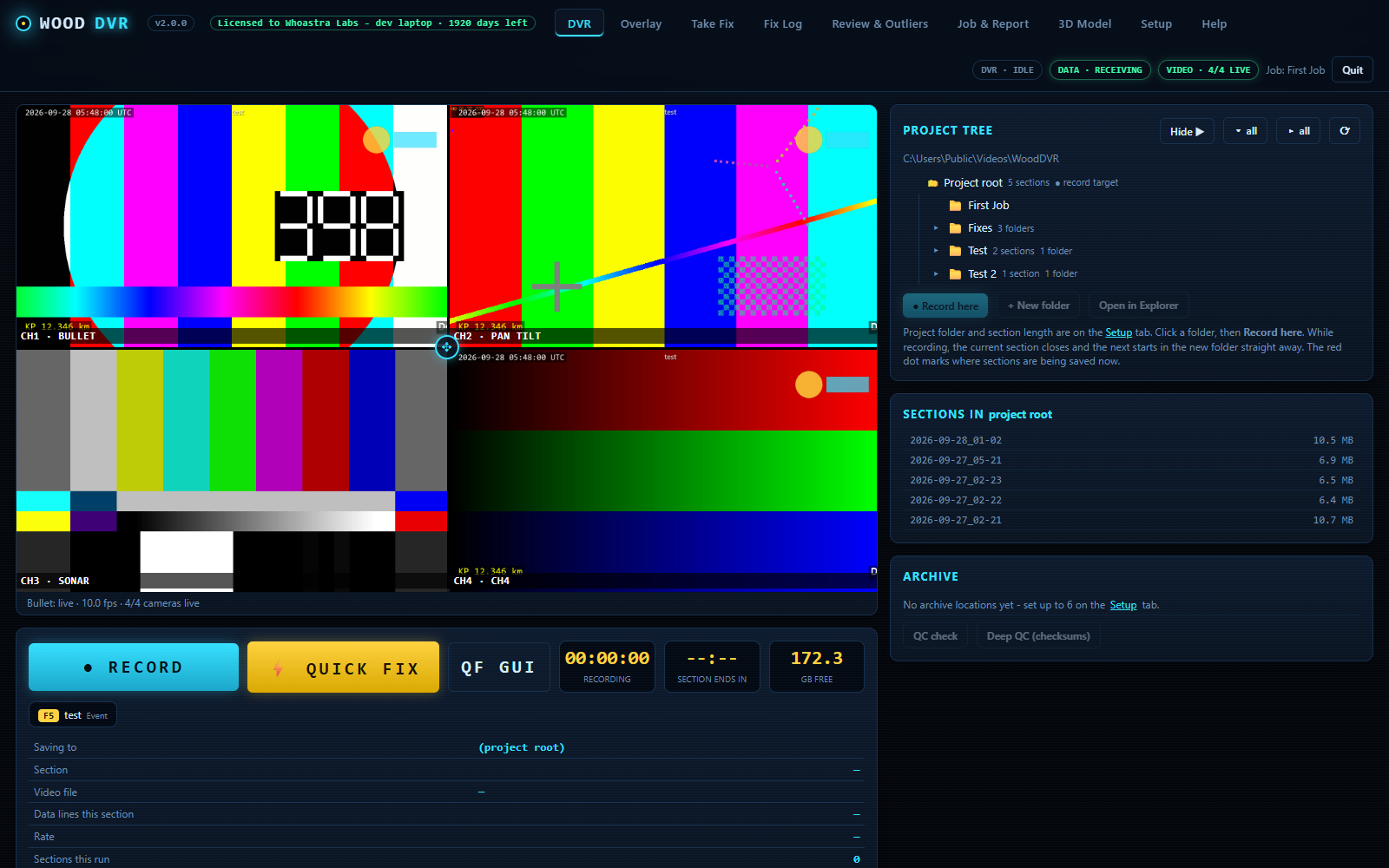
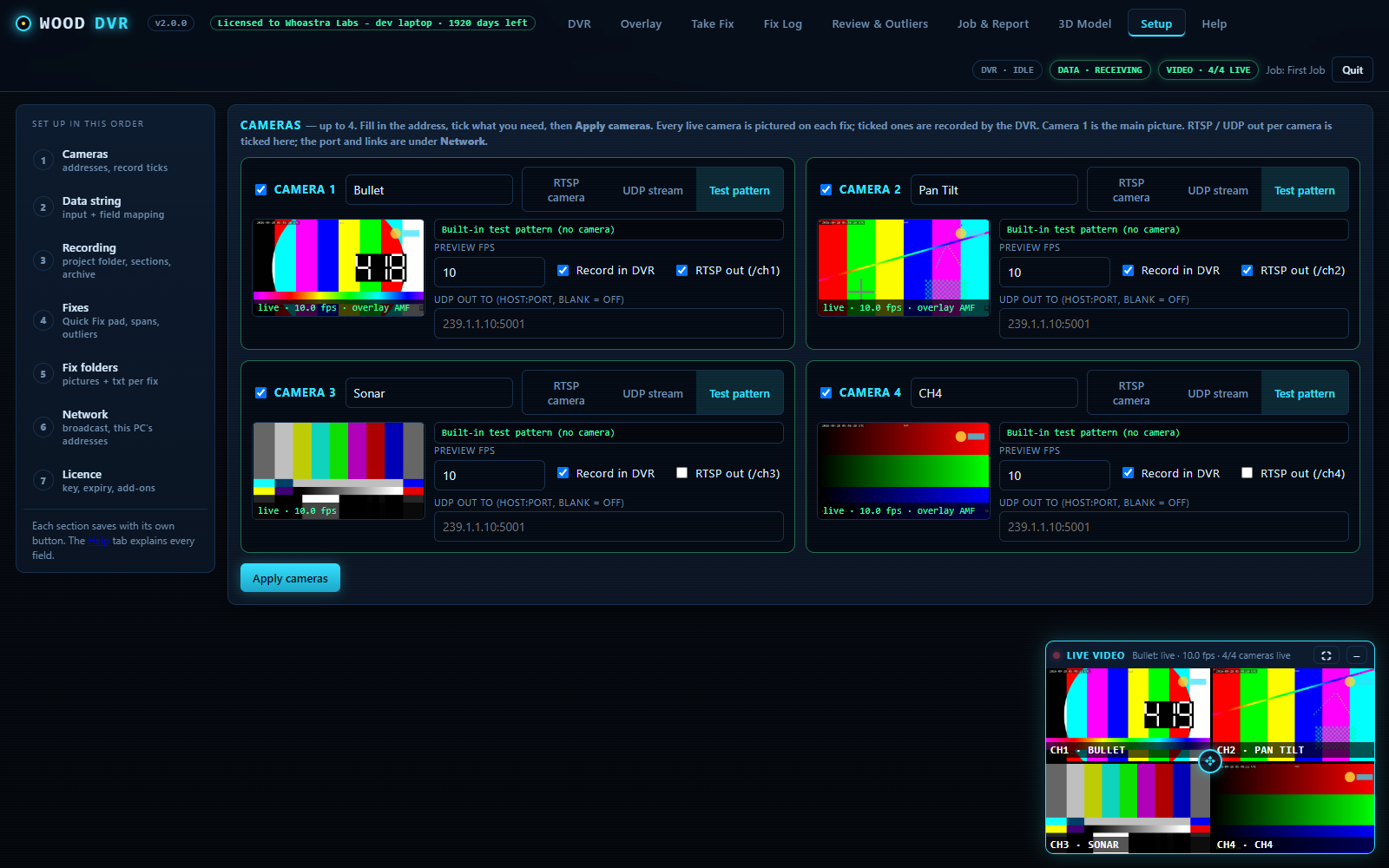
WoodDVR opens in your browser on the survey PC. Cameras, data string, recording, overlay, narration, fixes, reports and broadcast are tabs in the same app, and every fix lands in a folder beside the recording it came from.
DVR recording
Each camera is recorded as a straight copy of its stream: no quality loss, little CPU. Sections start on the clock every 30 minutes, each in its own folder with one video per camera and a data file holding every survey string received, time-stamped, plus event lines for fixes, spans and text changes. .ts files play in VLC and survive a power cut; record to a second drive or a NAS; disk-full self-stop and keep-awake while recording.
Survey overlay, burned in
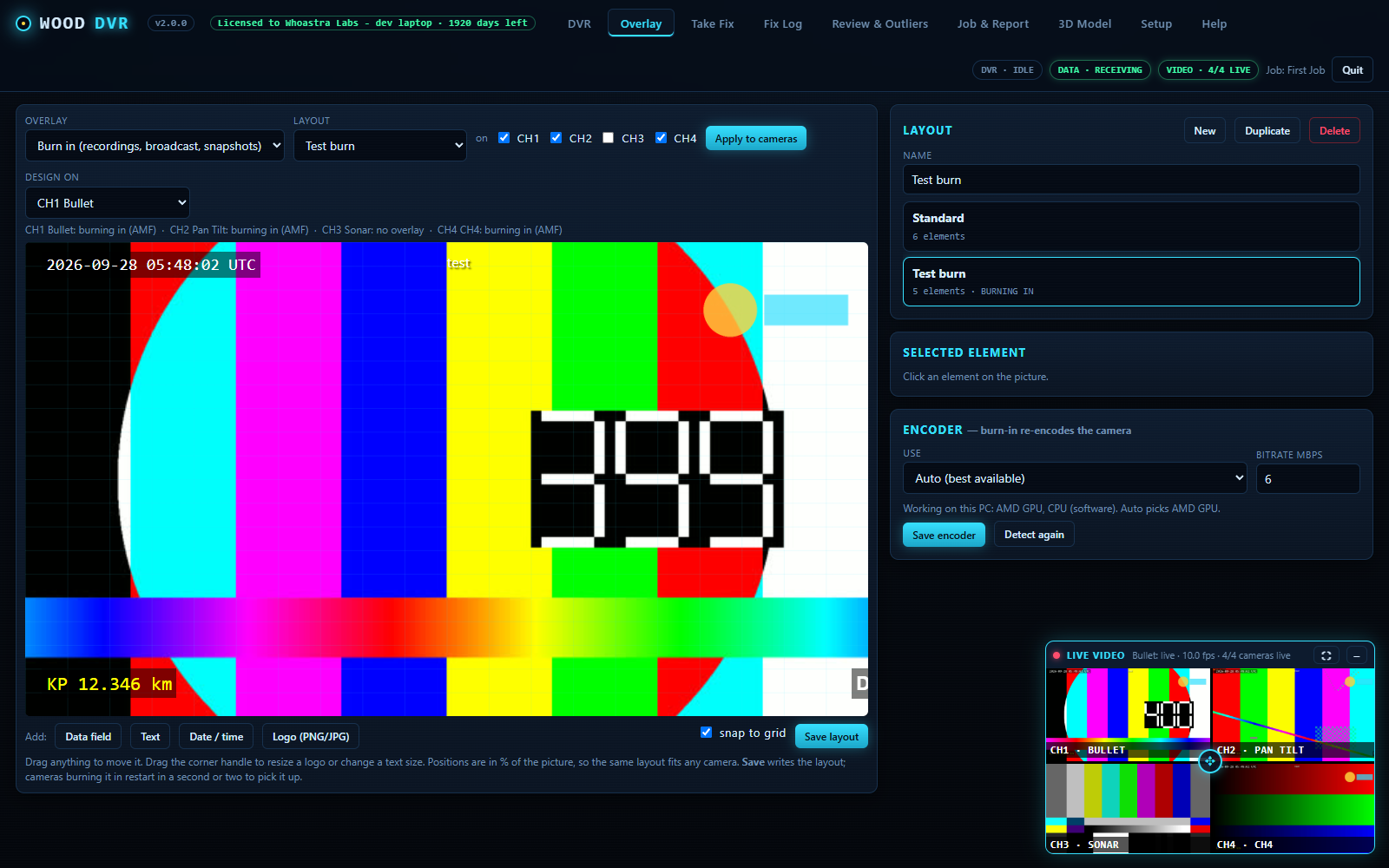
Drag data fields, free text, date and time and logos onto the picture. Burn-in encodes the overlay into the recordings, the broadcast and every fix snapshot, like a hardware overlay unit. Hotkey texts on F1 to F6 and F11, changed live and logged; GPU encoder auto-detected with a CPU fallback.
Position fixes with the numbers
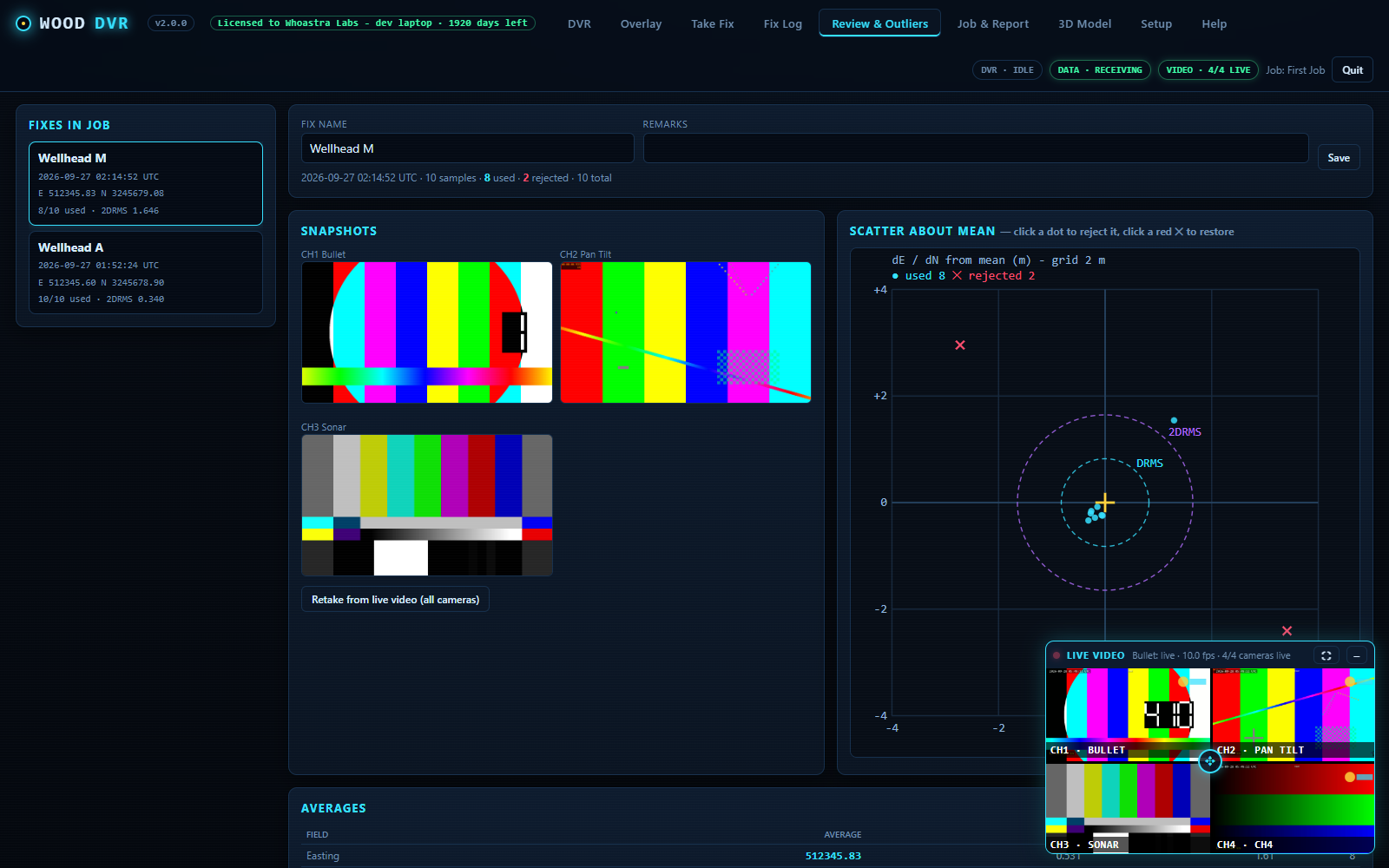
Position Average (F9) collects samples for a set time or count and reports mean, standard deviation, min and max, DRMS, 2DRMS and CEP50 with a scatter plot. Quick Fix (F10) is one reading and a picture from every camera. Spans (F8) pair a start and an end and work out the length from KP. Outlier rejection by sigma, radius, one field or a click; raw samples are never deleted.
Quick Fix pad
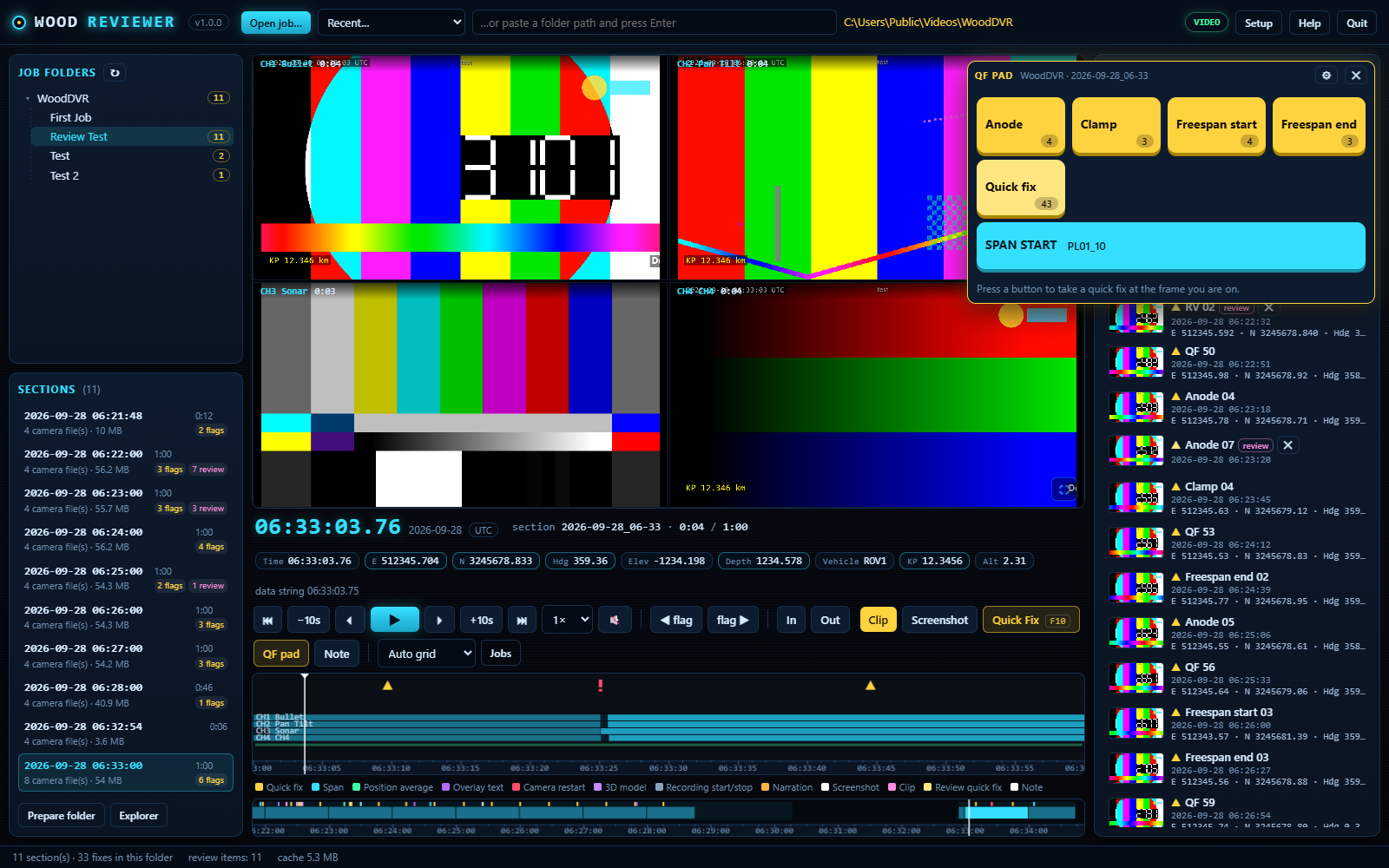
Up to 16 named buttons: Anode, Clamp, Freespan start, whatever the job calls them. Each press takes a quick fix with pictures from every camera, numbered per job. Floats over any tab or opens in its own window on a second screen.
Reports and nav CSV
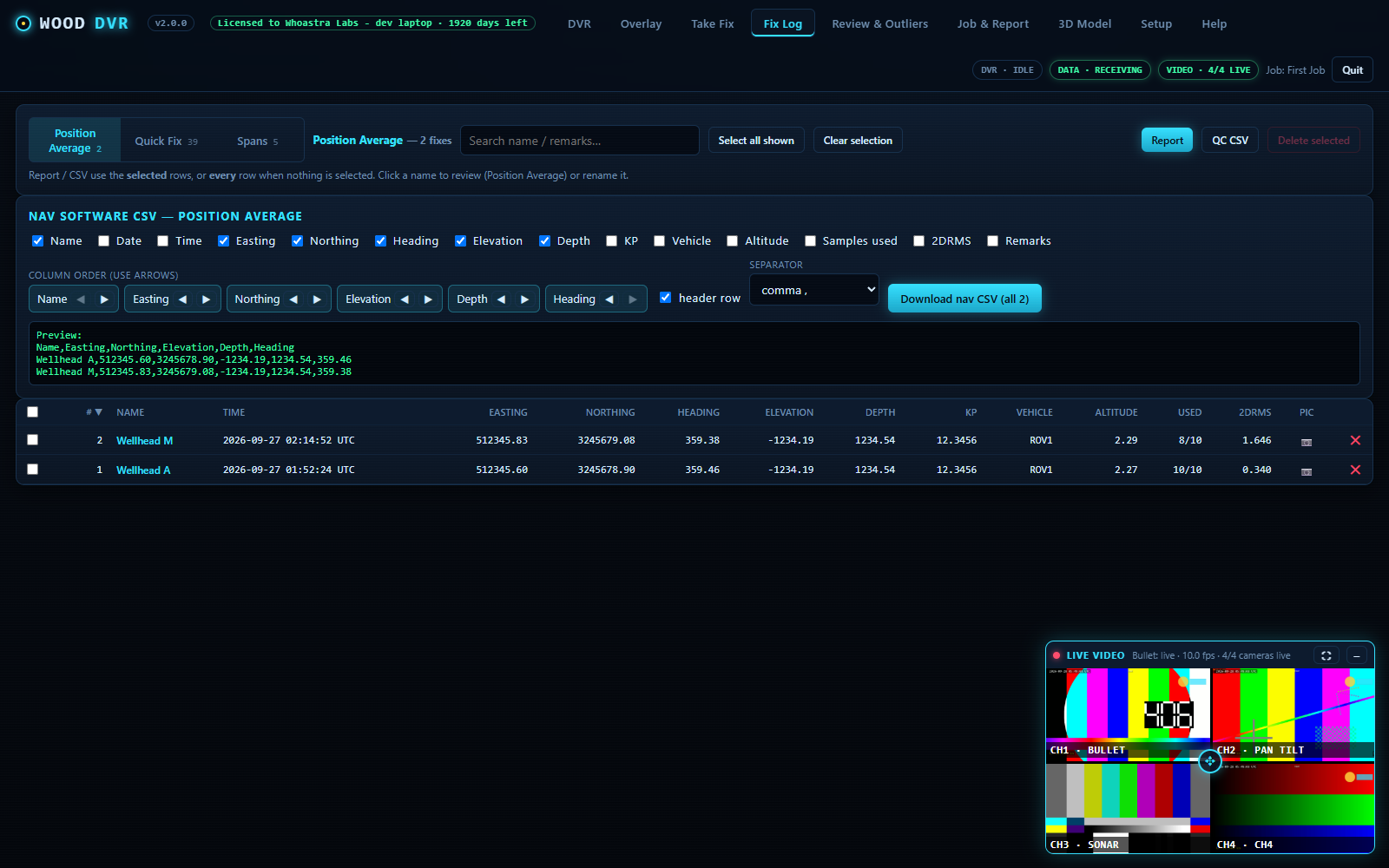
Printable reports with a summary table, then one page per fix with its pictures, statistics and plot; a PDF copy saves itself into the job folder. The nav-software CSV builder lets you pick and order columns with a live preview. Fix folders with a JPG per camera and a TXT per fix sit beside the recording.
Broadcast to the client
Any camera goes back out as UDP multicast or unicast MPEG-TS, or as an RTSP server on this PC. Viewers open it in VLC, VisualSoft or any player — with the overlay burned in and, with narration on, the surveyor's voice.
Archive mirror and QC
Up to six extra drives or NAS shares receive a copy of the whole project in the background, one section behind at most. An unplugged drive never stalls the cameras. Checksum on copy, QC and Deep QC checks, results logged as proof the copies match.
Narration, in the video
The surveyor's microphone is recorded as a sound track inside every camera file and the broadcasts, placed at the picture that was on screen at that moment. After each section the words are typed out on the PC by Whisper speech-to-text — subtitles beside every file, a transcript with the clock time of every sentence, no internet needed.
Any survey data string, any camera
UDP listen, TCP client or server, serial COM, or the built-in simulator; map each field to Easting, Northing, Heading, Depth, KP, time or an extra of your own. RTSP IP cameras and encoders with brand presets, or UDP MPEG-TS pushed from another system; SDI or HDMI through a small encoder box.
New in 2.1 · Narration and subtitles
The surveyor's voice, inside the recording. And in writing.
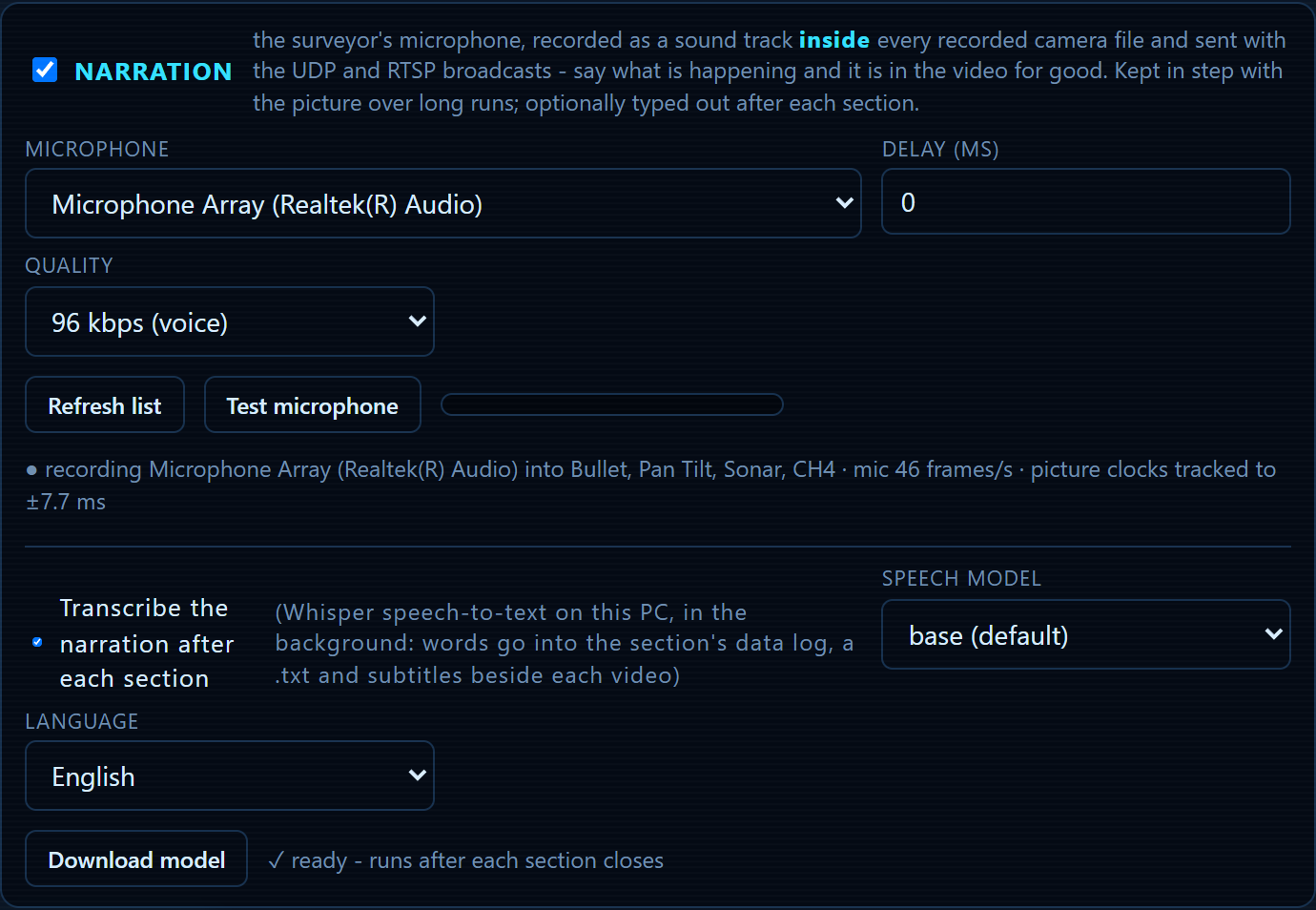
Plug in a headset and talk the job through. WoodDVR records the microphone as a sound track inside every camera file, so whoever plays the .ts later in VLC, VisualSoft or the Reviewer hears what was said over the picture it was said about. After each section the words are typed out by Whisper speech-to-text, on the survey PC, with no internet.
- One microphone, every camera. Tick Narration in Setup and the sound lands in all four recordings, the UDP broadcast and the RTSP server. Cameras are not restarted when it is switched on or off.
- Stays in step for months. Every piece of sound is stamped with the PC clock and placed at the picture that was on screen at that moment, so the microphone and the cameras cannot drift apart over a long job.
- Subtitles beside every file. An .srt next to each camera file, so VLC shows the words under the picture by itself. Hand the folder to the client and it just works.
- A transcript with the clock. A text file per section with the time of every sentence, and the same lines in the section's data log in the same time column as the fixes.
- Runs offline, at low priority. The base speech model ships in the installer. A 30-minute section takes a few minutes and recording is never slowed down.
Free with WoodDVR · WoodDVR Reviewer
Every camera. Every fix. One timeline. Free for everyone who needs to look.
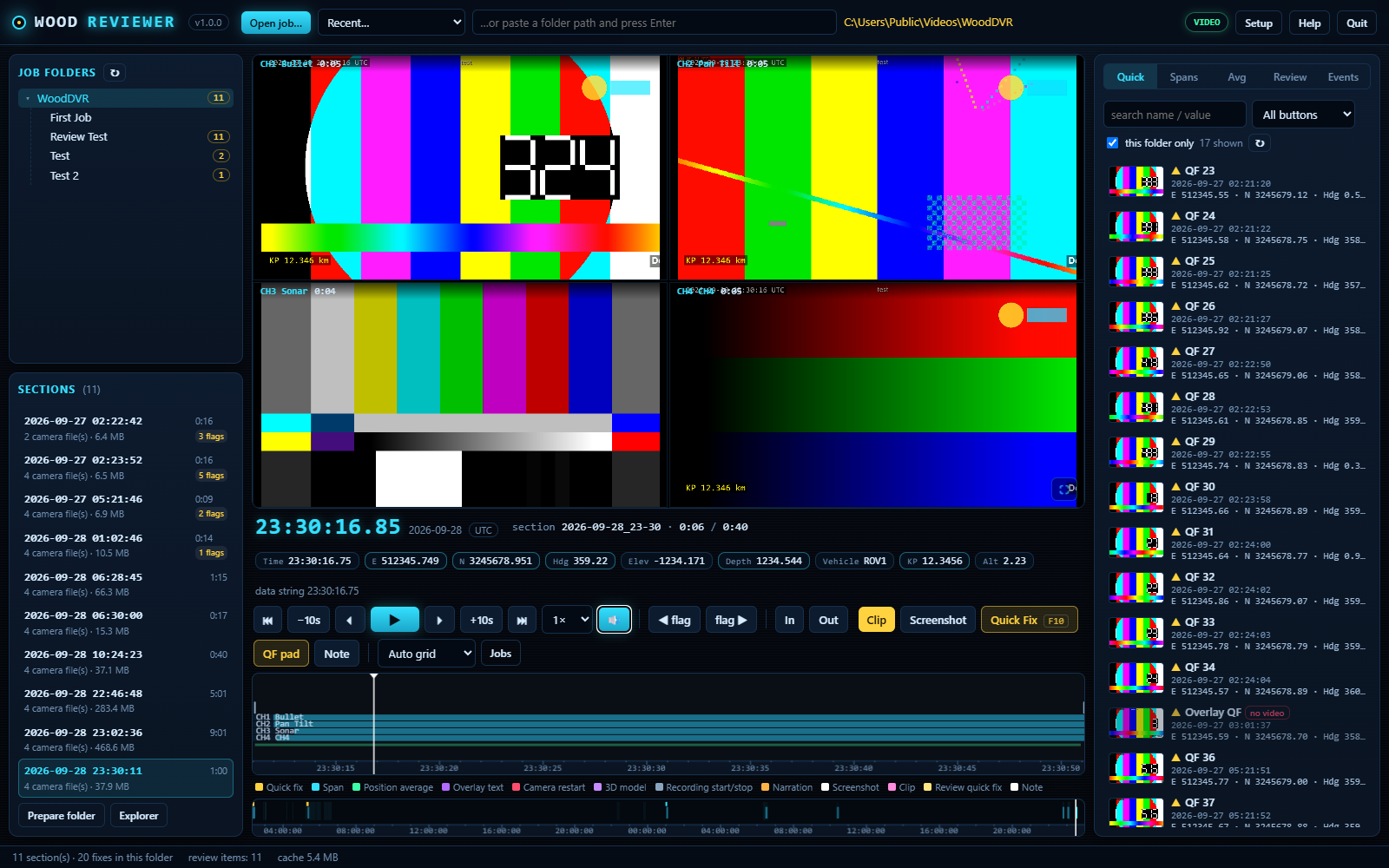
WoodDVR Reviewer is a second program that opens a job folder recorded by WoodDVR, or an archive copy of it on any drive, and plays every camera of a section together on the recording clock. Every fix, span, hotkey text and camera restart is a flag on the timeline, and every logged event, narration sentences included, is in the list beside it. Click a fix and the video is there. It is free, needs no key, and installs on as many PCs as you like.
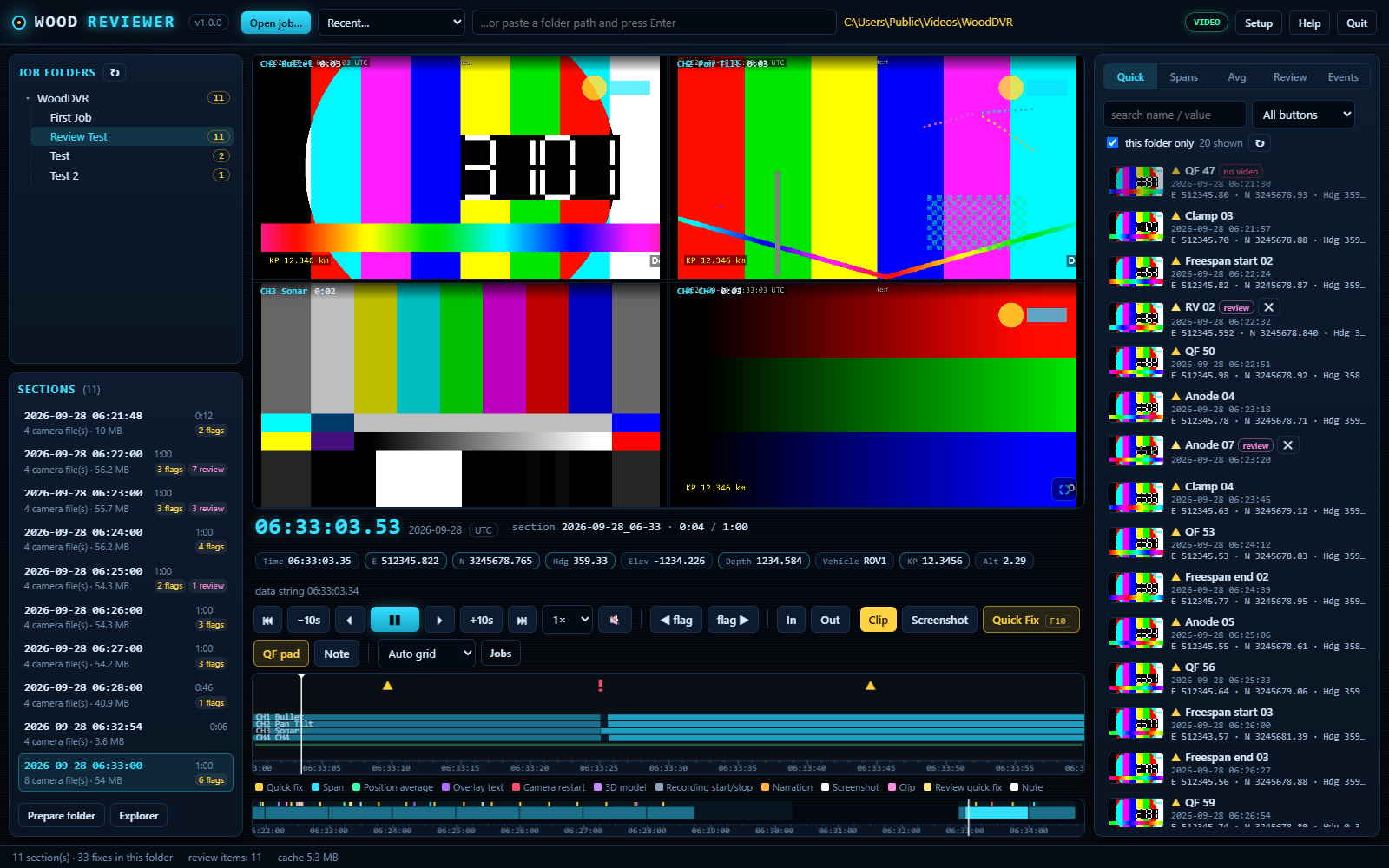
- Plays the recordings as they are. No conversion, no copies, no second disk. The .ts files are read straight from the folder and open in about a second, thanks to the keyframe index WoodDVR writes while it records.
- Every camera in step on one wall clock, with the position data at that frame under the pictures: Easting, Northing, depth, KP, heading, whatever the data string carried.
- Jump to any fix. Quick fixes, spans, position averages and every logged event in a searchable list; filter by pad button; click to land on the moment, double-click for the pictures, values and raw string.
- Screenshots, clips, review fixes. Full-resolution stills per camera or one combined picture. Frame-accurate MP4 clips or instant keyframe copies, per camera or as a 2×2 mosaic. New quick fixes and spans from the video with the same QF pad, saved beside the originals.
- Never touches the recordings. Section folders are opened read-only. Everything the Reviewer makes goes into a Review folder with the job, plus a Review log.csv that opens in Excel.
- Built for months-long jobs. Tested on a job of 1,500 sections and 6,000 fixes: the job opens at once and a folder lists in about a second.
Watch
Grid, focus with a strip, or one camera. Frame step, ¼× to 8×, full screen. Playback runs on into the next section by itself, and the strip at the bottom shows the whole folder: every section, every run, every flag.
Hear
Turn the sound on and the narration plays with the camera you are following. The transcribed sentences come in with the section's events, time-stamped, so a spoken "free span starts here" is as easy to find as a quick fix.
One hand on the keyboard
Space play, ← → frame step, [ ] previous and next flag, S screenshot, I O clip in and out, C make the clip, F10 quick fix, F8 span, N note, M sound. The same keys the DVR seat already knows.
Add-on · Photogrammetry
A 3D model of the object, built on the vessel.
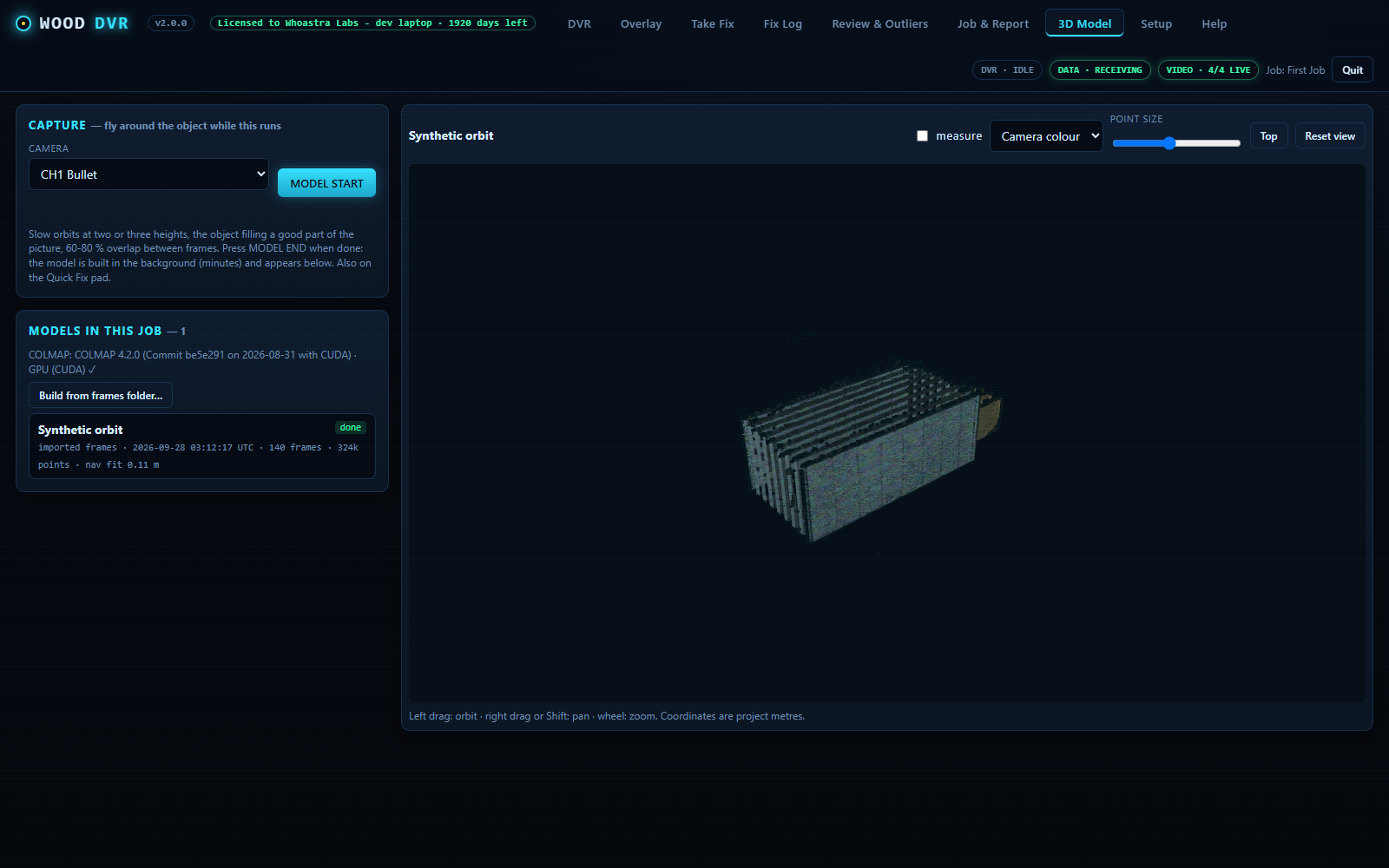
Fly the ROV around a wellhead, anode, clamp or damage site while WoodDVR captures frames from one camera together with the nav at that instant. It then builds a coloured 3D point cloud, scales it from the nav and places it in project coordinates. Minutes on a PC with an NVIDIA card.
- MODEL START and MODEL END on the 3D Model tab and on the Quick Fix pad; recording is never interrupted
- Output: .ply for CloudCompare, MeshLab, Blender, NaviModel or Qimera, plus .xyz (Easting, Northing, Depth, colour), cameras.csv and an accuracy note
- Built-in viewer: orbit, depth colouring, measure between two points in metres
- Frame matching guided by ROV position, so repetitive pipe and two orbits link up correctly
Pricing
Published prices. No quote round, no rental desk.
One licence runs one PC with all four cameras. A spread with two ROVs and two DVR seats needs two licences. Every price is in US dollars and includes support and every update released during the term. WoodDVR Reviewer is free, on any number of PCs.
| Term | Core licence | 3D Model add-on | Core + 3D | Notes |
|---|---|---|---|---|
| 30 days | $1,500 | + $500 | $2,000 | One job. Credited in full against a 1-year or longer licence bought within 60 days. |
| 6 months | $4,000 | + $1,500 | $5,500 | A campaign. |
| 1 year | $6,000 | + $2,000 | $8,000 | About $16 a day for the seat. Most chosen. |
| 2 years | $10,000 | + $3,500 | $13,500 | Two years for the price of twenty months. |
| Perpetual | $12,000 | + $4,000 | $16,000 | Never expires. Optional maintenance at 18% of list per year keeps updates and support coming. |
| WoodDVR Reviewer | $0 | – | $0 | Playback, screenshots, clips and review fixes for any WoodDVR recording. No key, no trial, as many PCs as you like. |
Fleet pricing
Five or more PCs on one order: 25% off every line, core and add-on alike. Mixed terms are fine.
Trial to licence
The three free days start the first time WoodDVR runs and are not reset by reinstalling. Buy any term at any point; there is no gap and nothing is lost.
Payment terms
Invoice by email, paid by wire transfer on net 30 terms for approved vendors. Vendor setup paperwork and wire details come with the quote. GBP and EUR quotes on request.
Price it yourself
Pick the term, the add-on and how many PCs. The total is what your invoice will say.
About $17 per PC per day. Support and every update during the term included. US dollars; wire transfer, net 30 for approved vendors.
How a licence is issued
Install and run
Download, install, set up your cameras and data string. Every feature works for three days.
Send your PC ID
Setup › Licence shows the PC ID. Email it with the term you want and the licensee name.
Invoice and vendor setup
Whoastra Labs LLC is set up as an approved vendor with your company. Payment by wire transfer, net 30. Fleet orders can be one invoice for all PCs.
Paste the key
A key file comes back by email as soon as the order is confirmed. Paste it or load it in Setup › Licence. Done, including offshore with no internet.
Computer requirements
Runs on a survey laptop. Best on one with an NVIDIA card.
WoodDVR itself uses about 6% of one core. Each camera runs its own ffmpeg: a straight-copy recording costs 10 to 20% of a core, a burned-in overlay re-encodes the camera and costs about a third of a core on a GPU encoder. Recording is light; it is the disk size that matters.
| Minimum (1 to 2 cameras, no overlay or GPU overlay) | Recommended (4 cameras, burned-in overlay, broadcast) | |
|---|---|---|
| Windows | Windows 10 or 11, 64-bit, with Microsoft Edge (for report PDFs) | Windows 11 Pro 64-bit, update restarts scheduled outside recording hours |
| Processor | 4 cores / 8 threads (Core i5 8th gen, Ryzen 5 3000 or newer) | 8 cores / 16 threads or more (Core i7, Ryzen 7 or 9). Without a GPU encoder, four 1080p cameras with overlay need 10 to 12 cores on their own |
| Graphics | Any. Intel Quick Sync, AMD or NVIDIA makes the overlay cheap | NVIDIA GTX 1650 / RTX or newer (NVENC, 4+ encode sessions), or Intel Arc / recent Quick Sync. Required for the 3D Model add-on at sensible run times |
| Memory | 8 GB | 16 GB (each camera's ffmpeg uses 150 to 300 MB) |
| System disk | SSD, 256 GB | SSD, 512 GB |
| Recording disk | Separate from the system disk. 6 Mbps per camera = 2.7 GB per camera per hour. Four cameras ≈ 11 GB an hour ≈ 260 GB a day ≈ 11 TB per 1,000 hours. USB 3 desktop hard drives keep up; archive to a second drive or NAS with the Archive feature | |
| Network | 1 Gbit wired port for the cameras | 1 Gbit wired for cameras plus a second port or VLAN for the data string and broadcast viewers. Never Wi-Fi for cameras |
| Screen | 1920 × 1080 | 1920 × 1080 or larger, a second screen for the client view or the Quick Fix pad |
| Power | Laptops: plugged in, lid-close set to do nothing, High performance plan. WoodDVR keeps Windows awake while recording. A UPS for desktop PCs offshore is strongly advised | |
What you supply
WoodDVR is software only. The PC, any encoders and the drives are yours, bought once and reused on every job. Approximate US street prices, September 2026.
The PCfrom about $1,000
A gaming-class laptop with an NVIDIA RTX card (RTX 4060 class from about $1,000) does four cameras with overlay and runs the 3D add-on. A small desktop with the same card is $1,500 to $2,400. If the survey PC you already own meets the recommended column, use that.
Encoders, SDI or HDMI cameras only$300 to $600 a camera
IP cameras and systems that already push RTSP or UDP need nothing. For SDI or HDMI, a 3G-SDI to IP encoder with H.264 output: single-channel boxes from about $300, Magewell Ultra Encode SDI $555, or a 4-channel SDI box about $600.
Drivesabout $300 each
A 16 to 20 TB USB desktop drive for recording holds a month of four cameras. A second one, or a NAS, as the archive mirror. Spinning drives are the sensible buy while SSD prices are high.
Networkunder $100
A gigabit switch and cables for the cameras. The installer adds the Windows Firewall rule for broadcast viewers.
Laptop, encoders for four SDI cameras, two drives, a switch. Plus the licence. The hardware is yours for every job after.
Two single-channel encoders and a recording drive. IP cameras: just the drive.
Compared
Against the rack-unit DVR systems.
The established products, Digital Edge Subsea's EdgeDVR and FET's VisualDVR with the VisualSoft suite, are excellent inspection systems sold as rack-mounted hardware on quote or rental. WoodDVR is a different shape: software on your own PC, at a published price. Here is where each one stands.
| WoodDVR 2.1 + Reviewer | EdgeDVR / VisualDVR | |
|---|---|---|
| What you get | One installer for your Windows survey PC, speech model included, plus the free Reviewer for any other PC | A 4U rack unit with drives, or a rental unit shipped to the vessel |
| Price | Published. From $1,500 a job, $6,000 a year, per PC | Quote or rental rate on request |
| Hardware | Your PC, encoders and drives, bought once | Included in the unit |
| Cameras | Up to 4 IP cameras (RTSP, UDP). SDI and HDMI through an encoder | Up to 4 channels, SDI and HDMI capture built in, SD to 4K |
| Recording | Straight-copy .ts sections cut on the clock, data string logged per section | Continuous recording with blackbox backup |
| Overlay burned into the video | Yes. Drag-and-drop designer, hotkey texts, logos | Yes. Digital overlay with logos and fields |
| Position Average fix with SD, DRMS, 2DRMS, CEP50 and outlier rejection | Yes | Not listed as a DVR feature ¹ |
| Quick Fix pad and Spans with KP length | Yes | Not listed as a DVR feature ¹ |
| Reports and nav-software CSV | Yes. Auto-saved PDF reports, column-builder CSV | Yes. Dive, photo, video and anomaly logs; in-field inspection reports (Pro) |
| Event and anomaly logging database | Not yet. Fixes, spans, notes and events are logged and reviewable, but there is no inspection eventing database | Yes. A core strength of both products |
| Offline review, screenshots and clips | Yes, free. WoodDVR Reviewer: every camera in step, every fix a click away, stills, clips, quick fixes and spans from the video, on any number of PCs | Yes. Offline video editing suite |
| Sonar recording | No. Video only | Yes (EdgeDVR) |
| Broadcast to other PCs | Yes. RTSP server and UDP multicast, overlay included | Yes. Network video streaming |
| Archive mirroring with QC | Included. Six locations, checksum, QC reports | Separately licensed (Edge Archive) |
| Surveyor's narration in the video, with offline subtitles and transcript | Yes. Sound track in every camera file and broadcast, .srt subtitles, words in the data log and on the Reviewer timeline | Not listed as a DVR feature ¹ |
| 3D model of an object, built on the vessel | Add-on | Not offered |
| Support and updates | Included in every licence | Support and maintenance agreement; out-of-scope support billed hourly |
| Try it | 3 days free, every feature, no card | Demo on request |
¹ Not advertised on the vendor's public product pages as of September 2026. Position averaging is usually done in the navigation software on those spreads. Competitor details are taken from their public product pages, September 2026, and may change. EdgeDVR is a product of Digital Edge Subsea Ltd; VisualSoft and VisualDVR are products of Forum Energy Technologies. WoodDVR and Whoastra Labs LLC are not affiliated with either. Check the details with the vendors.
WoodDVR is the right pick when
- The seat needs recording, overlay, fixes, spans and broadcast without a rack in the container
- You own the PCs and want the hardware to stay yours between jobs
- The client wants fix folders and PDF reports beside the video, ready to hand over
- The office and the client rep need to review the footage without buying a seat
- You need it this week, offshore, without a rental desk
Look at the others when
- The contract calls for a full inspection eventing and anomaly database (COABIS or NEXUS style deliverables)
- You need a full offline editing suite or sonar recording in the same box
- Your cameras are SDI and you would rather not add an encoder
Download
WoodDVR 2.1.0 for Windows.
Licensed per PC with published pricing and three free days; the Reviewer is free on any number of PCs. Every file is attached to a GitHub release, so the download is fast from any port and the release history is public.
WoodDVR Setup 2.1.0 with 3D
Contact
Questions, quotes and licences.
Every enquiry goes straight to Woody Straley, the survey party chief behind WoodSolutions. Replies usually within a day, including from offshore.